📍
Pick any location
Search a city, area or place and select your preferred point directly on the map.
GeoPilot Pro helps you choose, save and manage map-based locations with an easy interface, saved places, setup guidance and a streamlined Android workflow.
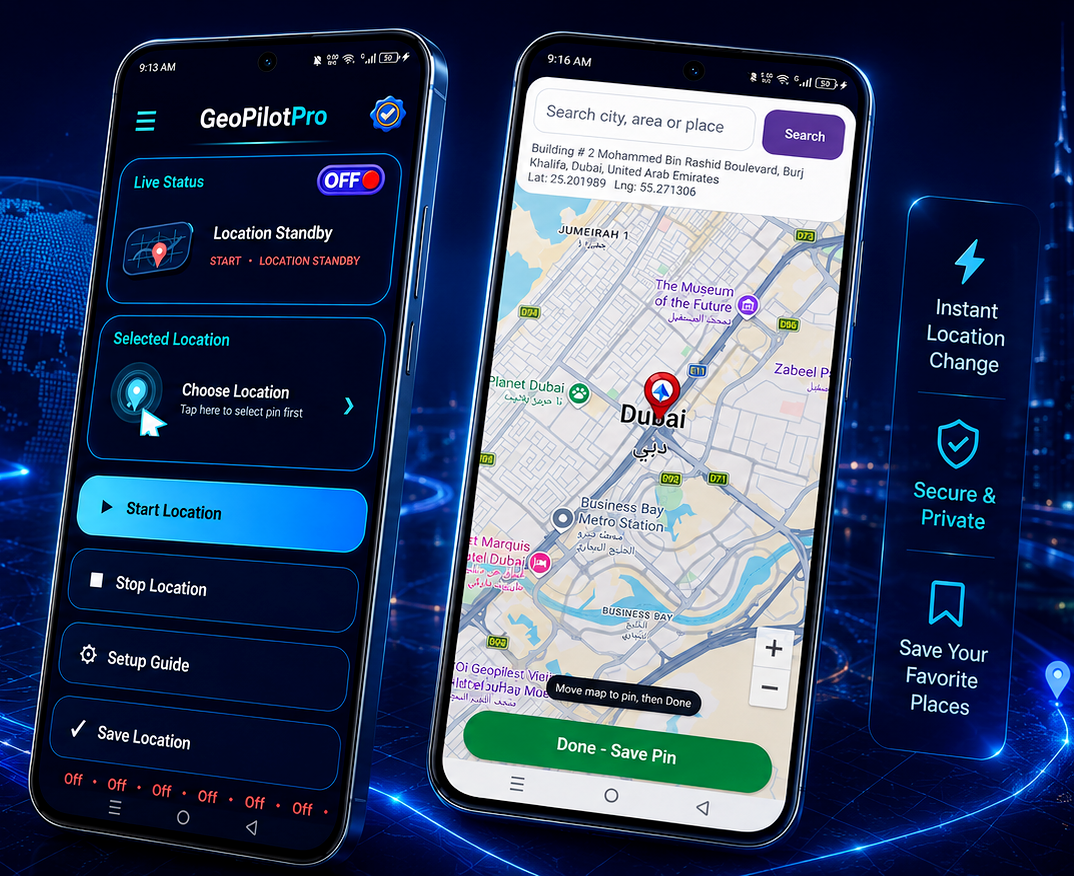
A polished Android location tool designed for users who want control, clarity and quick access to saved places.
Search a city, area or place and select your preferred point directly on the map.
Store your favorite places locally so they are easy to reopen and manage later.
Use the simple standby and start controls for quick access to your location flow.
View and manage places through a clean map interface that feels familiar and easy to use.
Your saved pins and app preferences are designed to stay on your device in the current app setup.
The app includes a setup guide so users can understand features and use the app more confidently.
GeoPilot Pro is designed for users who want a modern map-based experience for selecting and saving places. The app includes location tools, saved pins, status visibility and a practical interface built around usability.
Smart GPS location utility with a clean blue branded experience.
This app uses location access for core app functionality. Internet access may be used for maps and place search features. The privacy policy is written to support Play Store review and user transparency.
Open Privacy PolicyIf you need help regarding GeoPilot Pro, privacy, app support or Play Store related communication, please contact us by email.
geopilotpro@gmail.com